

The Cutover Migration Plan – Static vs. Dynamic Data
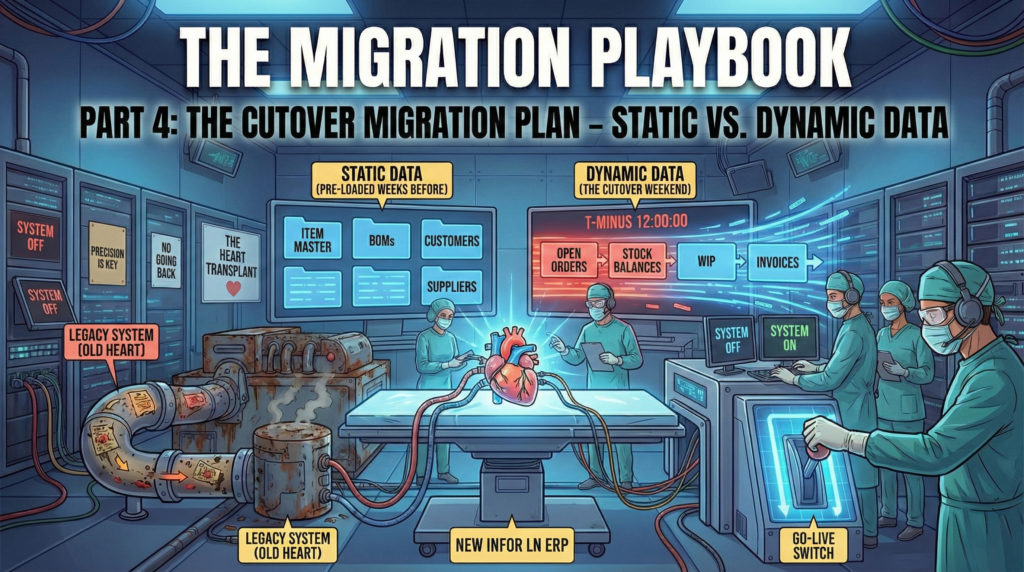
(Part 4 of the 6-part series “The Migration Playbook”)
In Part 3, we built the engine. We highlighted Exchange Schemes as a tool of choice and applied the DAL Doctrine to ensure data integrity.
Now, we face the defining moment of the entire project: The Go-Live Weekend.
This is not just another working weekend. It is a highly synchronized 48-to-72-hour cutover sequence where every minute is accounted for. If you are lucky, this happens during the Christmas Break, giving you a strategic window to go live cleanly in early January.
But if you are less lucky (which is often the case), it is a standard weekend sprint: you shut down the legacy system on Friday at 18:00, and you must have the ERP running, validated, and ready for business operations by Monday morning.
If you try to improvise during this window, you will fail. You need a script. A master plan. The absolute reference that dictates every movement. We call this document The Cutover Migration Plan.
The Cutover Migration Plan: More Than Just a List
The Cutover Migration Plan is not a simple To-Do list. It is a minute-by-minute schedule that coordinates the Technical Consultants, the Business Users, the Infrastructure team, and the Partners.
You can draft this plan using the tool that best fits your organization’s DNA. Whether you use Microsoft Project for waterfall precision, Notion for collaborative flexibility, or just a shared Excel file, the principle remains the same.
The tool is secondary; the content is mandatory.
Regardless of the software you choose, a robust Cutover Migration Plan must contain at least these columns for every single task:
- Task ID & Description: (e.g., “Load Item Masters”, “Validate Stock Value”).
- Owner: the specific person responsible. It must be a named individual, never a generic department.
- Start Time & Duration: rough estimation (but the less rough, the better).
- Dependencies: “Task B cannot start until Task A is 100% complete.”
- Validation Criteria: how do we know it worked? (e.g., “Row count matches legacy”).
- Upload Date: tracks exactly when the upload happened.
- Status: the current state of the task (e.g., “Pending”, “In Progress”, “Done”) to know exactly where we stand.
- Notes: a generic field to add specific details, deviations, or quick observations during the process.
Golden Rule: If a task is not in the Cutover Migration Plan, it does not happen. No “quick fixes”, no “while I’m here I’ll just update this parameter.” Discipline is your lifeline.
The Strategy: Static vs. Dynamic
The biggest mistake is trying to load everything during the Go-Live weekend. It is physically impossible. To survive, we split the data into two categories: Static and Dynamic.
1. Static Data
This includes Master Data that doesn’t change every minute: Items, BOMs, Routings, Customers, Suppliers, Prices.
The Strategy is: we migrate this data N days or weeks before Go-Live. We do not enforce a rigid deadline. This timeframe is decided by the Client based on the volume of data to be loaded and the complexity of the validation controls that must be performed.
- We load the full set into Production environment.
- We validate it leisurely.
- We implement a “Dual Maintenance” period. If a user creates a new Customer in the Legacy system during these 2 weeks, they must manually create it inside the ERP as well.
- On the Go-Live weekend, 80% of the data is already there. We only have to worry about the transactional data.
2. Dynamic Data
This is the data that changes until the very last second: Inventory Balances, Open Orders, and Work in Progress (WIP). This can only be migrated during the system blackout.
The WIP Nightmare: To Move or Not to Move?
Migrating Work In Progress (WIP) – production orders that are halfway finished on the shop floor – is the most complex technical challenge in any ERP project.
Imagine an order for 100 pieces. Operation 1 (Cutting) is done. Operation 2 (Welding) is 50% done. Operation 3 (Painting) is untouched. How do you migrate this into Infor LN for example?
Option A: “Drain the Line” Strategy: stop releasing new orders 2 weeks before Go-Live. Force the factory to finish everything that is open.
- Pros: You start clean. No complex migration logic.
- Cons: Not always possible for companies with long lead times (e.g., building machinery that takes 6 months).
Option B: “Operation State” Migration: If you must migrate open WIP, you cannot just insert a record saying “50% done.” You must simulate the reality inside the ERP.
- Migrate the production order in LN.
- Replicate Material Consumption: you cannot migrate a transaction. You must re-execute the issue in LN. Depending on your parameterization (Backflushing vs. Manual), you either report the completed operation to trigger the automatic issue or manually issue the material to align the WIP balance.
- Migrate the Hours: Inject logic to book the labor hours already spent.
- Result: The order in LN sits at the correct cost and status, ready for the next operation.
Avoid Option B if you can. It requires massive testing and often results in costing discrepancies. If you can go with option A, do it.
Open Order Scope: What is “Open”?
In Part 1, we decided on a Clean Cut. Now we must enforce it strictly in the Plan. When we say “Open Scope,” we mean future commitments, not historical records. We migrate only what is alive and actionable.
This logic applies universally to Sales Orders, Purchase Orders, Contracts, and any other open commitment. We do not migrate history; we migrate the remaining balance of what is yet to be delivered or received.
Finally, regarding Inventory, the rule is financial: the total value of the imported stock should match the value in the client’s legacy system. If discrepancies are found, we must analyze the Delta. We need to narrow down the difference to understand if it stems from rounding issues or specific cost mismatches. Matching Costing and Inventory Valuation is the most delicate phase of the validation process.
The Point of No Return
In the Cutover Migration Plan, there is a milestone defined as the Point of No Return.
At this moment, the Steering Committee meets. We review the dashboard:
- Static Data: 100% Loaded.
- Dynamic Data: 100% Loaded.
- Financial Reconciliation: Matched.
- Critical Issues: 0.
If the answer is GO, we open the system to users. There is no turning back. The Legacy system becomes Read-Only. If the answer is No-Go, we trigger a Rollback Plan. We unlock the Legacy system, and the business continues on the old ERP on Monday morning as if nothing happened.
Having the courage to call a “No-Go” is what separates a senior partner from a junior vendor. Better to delay by a week than to destroy the business for a year.
Almost There
The data is loaded. The balances match. The Point of No Return has been crossed. On Monday morning, the users will log in. They will see screens they have only seen in training. They will be nervous. For sure they will make mistakes.
But most of all, the system will throw errors. In the next part, we will discuss how to interpret those errors. We will talk about The Language of Logs and the best practices for managing the chaos of the first week without losing your mind.
Written by Andrea Guaccio
April 2 2026